- Getting started with byod management.
- Preventing distraction.
- Fostering trust in students who are using their own devices.
- The role of students in classroom management.
- Explaining this will work to administrators.
- Getting parents to support responsible use.

Monday, April 7, 2014
Listen to the experts discuss BYOD management
Listen as bring your own device (BYOD) experts discuss best practices for classroom management. Special guests Jill Hobson @hobsonjill, Michelle Luhtala @mluhtala, and Jason Suter @JKsuter all currently work in BYOD environments and share with you insights about the following topics:

Friday, April 4, 2014
Google Hangout on Air - Managing BYOD - Live on April 7th!
Join us for a BYOD Google Hangout on Monday, April 7th at 9:00 p.m. Eastern Standard Time.
Topic
Managing the BYOD classroom
Guests will discuss the following
- Getting started with byod management.
- Preventing distraction.
- Fostering trust in students who are using their own devices.
- The role of students in classroom management.
- Explaining this will work to administrators.
- Getting parents to support responsible use.
Our special guests include
- Jill Hobson @hobsonjill
- Michelle Luhtala @mluhtala
- Jason Suter @JKsuter
Connect with them on Twitter!
Backchannel
- Join our backchannel conversation on Twitter using the hashtag #BYODEquity. See all the backchannel hashtags on our Tagboard at http://tagboard.com/byodmanagement
Join the hangout at this link
https://plus.google.com/events/cnb6l98874hjdvh0ec92r289ktk
https://plus.google.com/events/cnb6l98874hjdvh0ec92r289ktk
Monday, March 31, 2014
5 classroom management tips for BYOD
Chatting with friends, playing games, cheating, cruising YouTube. These are just some of the behaviors educators fear will become a reality when students bring their own devices...unless they incorporate updated classroom management practices. The below techniques will keep students’ attention despite the irresistible draw of the Internet. Simple practices transform their devices into tools of engagement rather than distraction.
2) Provide time for distraction
 |
| The Simpson's Ms Krabappel could have used these tips |
Here are five management tips that make for a successful technology-rich classroom.
1) Let students know what happens when technology is not in use
Teachers should have a procedure for technology when not in use. This should require just a few words and be very clear. For example if using laptops it may be saying something like, screens down meaning devices should be placed face down on desks.
2) Provide time for distraction
Just like adults, students want some time during a day or period where they can take a mental break. Let them! Tell students when they can have a few minutes during a lesson to do what they want. That may be socializing, checking in with parent or friend, using the restroom, playing a game, having a snack, or continuing on with their work.
Friday, March 28, 2014
Ideas for Managing the BYOD Classroom
 If you are empowering students with the freedom to learn with their own devices, you must have classroom management procedures in place. The nice thing, however, about student devices is that you don’t have to worry about distribution, collection, storage, and imaging of devices. Your students do!
Below is a possible classroom management protocol. You’ll want to modify this to your particular classroom needs and discuss with students prior to introducing cell phones into the classroom.
- Upon entry and departure of school please ensure cell phones are set to silent.
- Use phones at times your teachers designate.
- When phones are not in use place them face down on the upper right side of your desk.
- If you notice someone in the class using their cell phone inappropriately, remind them to use proper cell phone etiquette.
- If at any time your teacher feels you are not using your cell phone responsibly you will be asked to place your phone in the bin in the front of the room with a post-it indicating your name homeroom class.
- After the first infraction each month you can collect your phone at the end of class.
- After the second infraction you can collect your phone at the end of the day.
- After the third infraction your parent or guardian will be asked to retrieve your phone. If you use the phone inappropriately again during the month your parent or guardian will be required to retrieve your phone.
- At the beginning of each month, you have a clean slate.
Wednesday, March 26, 2014
Starting a Student Support Team in Your School
 If we want students to succeed in a global economy, we need to provide them with access to technology in the schools. This may be via BYOD or school purchases. Either way as more and more schools are able to purchase devices, they are now struggling with models to put in place to support the hundreds of devices being used by students and staff.
A well thought-out model for instructional and hardware support is necessary for success. This includes the development of Student Support Teams to create and maintain a successful 21st Century environment. These support teams are made up of students who will provide instructional and hardware support around 21stCentury tools, skills, and hardware. They are great for students because they help them to begin developing a passion and expertise in using and teaching technology skills which they can carry with them for the rest of their lives. They are great for schools, because it allows them to utilize their best resource to support instruction…their students.

While schools realize the importance of the development of such teams, they often struggle with where to begin in launching such a team. Some technology-rich schools are creating Student Support Teams called iSquads designed to improve a school's capacity to integrate technology into teaching and learning.
Here are some ideas to get started.
Monday, February 10, 2014
#BYOD gurus engage in #BYOTchat about equity + access
Watch Tim Clark (@TimClark45), Willyn Webb (@WillynWebb), Michael Mills (@AquiAmigo) and Lisa Nielsen (@InnovativeEdu) in a one hour video discussing equity and access when it comes to bringing your own device. Take a watch and you'll enjoy a great conversation where these gurus share ideas that have worked and advise what to steer clear of when working toward a successful bring your own device/technology environment. As made apparent in the below thumbnail, the conversation was filled with a few laughs as well.
Guests shared plenty of terrific resources which are captured in the Tweets below.
Guests shared plenty of terrific resources which are captured in the Tweets below.
BYOD for everyone! featuring @DaisyDyerDuerr! // How to Jumpstart Tech Use In Low-Income Schools http://t.co/txklZJaCN5 #byodequity
— Michael S. Mills (@AquiAmigo) February 11, 2014
TRUST encompasses the Responsible Use Guidelines of Forsyth County Schools. #byodequity pic.twitter.com/N1qFQERuLX
— Tim Clark, Ed.D. (@BYOTNetwork) February 11, 2014
Learn more about the Free Wi-Fi Zones of Forsyth County, GA http://t.co/xhfUxsaG3U #byodequity
— Tim Clark, Ed.D. (@BYOTNetwork) February 11, 2014
@Kajeet4Edu has been a great partner in access equity for Forsyth County Schools http://t.co/rDFdXxogVs #byodequity
— Tim Clark, Ed.D. (@BYOTNetwork) February 11, 2014
11 innovative strategies for ensuring #BYODEquity http://t.co/3MOJbVecnT #BYOTchat #BYOD
— Lisa Nielsen (@InnovativeEdu) February 11, 2014
Take a look at the video. Make a comment. Reply to some Tweets and keep the conversation going during weekly #BYOTchats on Twitter at 9 p.m. est on Thursday nights. Want to get credit for your BYOD communicating? You can get up to 18 contact hours from Bowling Green State University. For details visit http://byodbgsu.blogspot.com/2014/02/join-our-byod-community-and-get-contact.htmlSunday, February 9, 2014
Google Hangout on Air - Equity + Access for All with BYOD - Live on February 10th!
Join us for a BYOD Google
Hangout on Monday, February 10th at 9:00 p.m. Eastern Standard Time.
The topic
Equity + Access for All
Guests will discuss the following
- Why ensuring equity and access is important
- How to get started
- What happens for students who don’t have devices
- Tips for parent outreach
- How you prepare infrastructure
- Handling repairs
- And more!
Our special guests include
- Tim Clark @TimClark45 or @BYOTNetwork
- Willyn Webb @Willyn Webb
- Michael Mills @AquiAmigo
Connect with them on
Twitter!
Backchannel
Join our backchannel
conversation on Twitter using the hashtag #BYODEquity. See all the
backchannel hashtags on our Tagboard at https://tagboard.com/byodequity
Join the hangout at this link
https://plus.google.com/events/cp40qmnlcq6mm83b6h8o1mbh1ds
Join the hangout at this link
https://plus.google.com/events/cp40qmnlcq6mm83b6h8o1mbh1ds
Wednesday, February 5, 2014
Join our BYOD community and get contact hours from BGSU!
Did you know that you can receive up to 18 contact hours from Bowling Green State University by joining the community of connected educators interested in discovering what it means when we empower students to BYOD. As a part of the community you are invited to participate in Google Hangouts, BYOD Twitter chats, interact on the BYOD Facebook page https://www.facebook.com/BYODK12 and contribute posts to this blog!
Interested?
Register at: http://www2.bgsu.edu/colleges/edhd/pdregister.html
Look for “Bring Your Own Device (BYOD) Learning Community” and select the yellow button that says “Register.” You will receive information with further details, links to online communities, and requirements for contact hours after registering.

Friday, January 31, 2014
11 Innovative Strategies for Ensuring Device Equity
An abridged version of this article originally appeared at ED Tech: Focus on K-12.
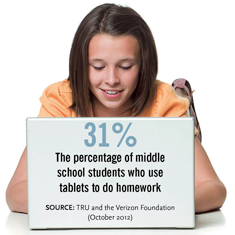
School officials wondering what to do for students who lack their own notebook computers, smartphones or tablets can acquire extra devices with a little bit of ingenuity.
When I began teaching as a librarian in Harlem in the 1990s, my district was embarking on what was then considered an innovative program: putting a pod of four computers in every classroom. I still recall cringing as I heard some teachers say to students, "If you finish your work early, you can go 'play' on the computer." Back then, failing to recognize these devices' powerful learning potential was all too common.
Rubberball Productions/Getty Images
I loved having the opportunity through my job to expose children to a world of possibilities through books. Access to computers and the Internet took that to a whole new level, giving students instant feedback and interactivity while empowering them to become producers — rather than simply consumers — of information. I watched many of them discover creativity they didn't realize they had. Suddenly, they were using technology to draw, illustrate, write, connect and create professional-looking work that they couldn't wait to share with their families and the school community.
Thursday, December 19, 2013
How to contribute to the BGSU Blog
What's your BYOD story? Members who signed up (or plan to sign up) for the BGSU BYOD learning community (you can register here) can get up to 18 contact hours (visit this link for details) for sharing their stories on this blog. Here's how.

1) Write you post and send it to a peer to review and edit.
2) Once you register for the BGSU BYOD learning community you will be invited via email as a blog contributor. After you accept your invitation, this blog will be listed as one of your blogs.
3) Visit www.blogger.com/home and select the pencil icon to create a new post as indicated below.

Sunday, November 10, 2013
BYOD, Communities and Learning
By Pamela Livingston
Note: Pamela Livingston was a guest in our latest Google Hangout "Cultivating a Culture of Community." In this post she expands upon her advice in the Hangout.
Note: Pamela Livingston was a guest in our latest Google Hangout "Cultivating a Culture of Community." In this post she expands upon her advice in the Hangout.
When invited to visit BYOD schools, I pose two overarching questions
- How are students involved in using technology here?
- How will technology grow your learning community?
These questions become extremely important with BYOD programs. They are important because if you are expecting students to supply their own device for learning, you need to ensure two things are in place.
- Students are fully involved and on board right away. Bring students into committees and have them part of surveys and the planning, ask their opinions as experts. They reside in the digital world and are your most impacted stakeholders in terms of their current and future academic, career, professional and personal lives. And keep asking them, many times – formally and informally. Follow up on their ideas and suggestions. If BYOD is bought in as a strategy by the students who understand your respect and understanding of them and who realize the entire program was built with their buy-in and feedback - you will have tee’ed up your program for success.
- Schools needs to be brought together with technology. With BYOD, schools should not be segmented into classroom silos of technology. Instead, technology should bring schools together. The school should have an overarching online community for social learning where everyone can communicate and collaborate in whole-school groups, in whole-grade groups, in whole classroom groups, and in project-based groups. This should be the same social community not a different one in each classroom, grade level, division, or school. Build and grow your online social learning community with your students so they have uniformity and connectivity as they move through your educational institution – and so that teachers can have ONE place for their professional learning communities and adult professional discussion forums year-after-year.
You can hear Pamela Livingston discuss this and more in our Google Hangout recording which you can access here.
_____________________________________________________________
Pamela Livingston is the author of ISTE's book "1-to-1 Learning : Laptop Programs That Work", Pamela has written for educational publications and presented/keynoted in the U.S.and overseas. She previously led technology at K-12 schools. Her Web site is http://www.pamelalivingston.com/
Tuesday, November 5, 2013
Cultivating a Culture of Community Google Hangout
Did you miss our November 4th hangout, Cultivating a Culture of Community? No problem, you can watch it below.
Special Guests
Thank you to our special guests. Connect with the on Twitter!
Backchannel
Join our backchannel conversation on Facebook at this link or on Twitter using the hashtag #BYODBGSU. See all the backchannel hashtags on our Tagboard at http://tagboard.com/byodbgsu.
In the hangout we addressed the following topics
- Why creating a culture of community is important
- What has worked as far as getting others on board.
- Successes, challenges, and/or frustrations when trying to create a culture of community.
Watch the hangout.
Special Guests
Thank you to our special guests. Connect with the on Twitter!
- Michelle Luhtala @mluhtala
- Pamela Livingston @plivings
- Andrew P. Marcinek @andycinek
- Ryan Lee @ryan_rlee
Backchannel
Join our backchannel conversation on Facebook at this link or on Twitter using the hashtag #BYODBGSU. See all the backchannel hashtags on our Tagboard at http://tagboard.com/byodbgsu.
Links
Below are links mentioned in the hangout.
Articles
Videos from Michelle Luhtala
- Are you using your phone for academic purposes? http://vimeo.com/77006044
- What BYOT looks like:http://vimeo.com/77006325
- Build capacity for power! Literally... power http://vimeo.com/77006692
- We trust you - http://youtu.be/yIZ48MQIp48
Monday, November 4, 2013
Live tonight! Google Hangout on Air - Cultivating a Culture of Community
Our first Google Hangout took place on November 4th at 9:00 p.m. Eastern Standard Time. Visit the "Google On Air" tab at http://byodbgsu.blogspot.com/p/google-on-air.html to view the hangout.
Topic "Cultivating a Culture of Community."
During the hangout guests discuss the following:
- Why creating a culture of community is important
- What has worked as far as getting others on board.
- Successes, challenges, and/or frustrations when trying to create a culture of community.
Our Special Guests
Thank you to our special guests. Connect with them on Twitter!
Thank you to our special guests. Connect with them on Twitter!
- Michelle Luhtala @mluhtala
- Pamela Livingston @plivings
- Andrew P. Marcinek @andycinek
- Ryan Lee @ryan_rlee
Backchannel
Join our backchannel conversation on Facebook at this link or on Twitter using the hashtag #BYODBGSU. See all the backchannel hashtags on our Tagboard at http://tagboard.com/byodbgsu.
Monday, October 14, 2013
The BGSU BYOD Community
Check out members of the BYOD BGSU Community!
Note: To see people's comments, select full screen on the bottom right and then select "Show Info" on the top right.
BYOD at BGSU presentations and handouts - Oct 14
Below are the presentations shared at BGSU "Preparing Students for their Future" conference on October 14, 2013. Here is the handout that accompanied the presentations. Keep the conversation going by joining our learning community. Details here.
This presentation sets the stage for "Learning Behind the Screens."
This presentation outlines the seven building blocks to success with BYOD.
This presentation outlines the five steps to harnessing the power of student devices for learning.
This presentation sets the stage for "Learning Behind the Screens."
This presentation outlines the seven building blocks to success with BYOD.
This presentation outlines the five steps to harnessing the power of student devices for learning.
Saturday, October 5, 2013
Bring Your Own Device #BYOD #ConnectedEducators Learning Community
Interested in discovering what it means when we empower students to BYOD? You are invited to join a vibrant connected educators learning community to do just that and you can even received contact hours from an accredited state University.
The community includes blog posts, twitter chats, Facebook pages, Google communities, and video conferencing that will take place throughout the year.
Anyone can join, but you can receive up to 18 contact hours from Bowling Green State University by registering at http://www.bgsu.edu/colleges/edhd/pdregister.html. When you get there, look for "Bring Your Own Device (BYOD) Learning Community" and select the yellow button that says “Register.” The fee is $50. Note: All contact hours can be accumulated online. There is an optional face-to-face event.
To follow is a timeline of the four topics that will be addressed and the various platforms that will be used, followed by an outline explaining how to accumulate contact hours.
Wednesday, September 25, 2013
Developing a #BYOT / #BYOD learning network
So, you’re interested in supporting bring your own device (BYOD) where you work. Congratulations! You are not alone. Innovative educators understand that there is no better way to support your students for the real world than providing settings they encounter in the real world. One of the best ways to get started and keep going is by developing your professional learning network of others who are also involved in this work.
Here are some resources to do just that.
Twitter
- People BYOD K12
A list of educators who discuss BYOD / BYOT - Chat
#BYOTchat
Online Twitter chat every Thursday from 9:00-10:00 PM (EST) - Hashtags
#BYOD #BYOT #BYOTchat #BYODBGSU
Tuesday, September 3, 2013
10 BYOT / BYOD Back to School Basics
 |
| Windows Phone 8 |
In 2012/13 Blackberries are old school adult devices. iPhones, Androids, and Microsoft’s new Windows 8 devices are what the cool kids are using in school. Below are the BYOT / BYOD back-to-school basics that will help ensure your students' personal learning devices are geared up for the upcoming school year.
- Pen & Paper - Old school pen and paper are out. Digital notes are in. Ask your students to select a notetaking app. This may be a simple memo tool or something more complex like Evernote.
- Video - 21st century educators won’t waste students’ time with video capture of lectures. Those will be uploaded by the teacher to their online space using their own videos or ones phone in apps like TED or Khan Academy, but students will want to tell their stories or create work using video capture. iMovie and MovieMaker rule the roost. You can start there but there are also many other free apps available like Videolicious, Viddy and Splice. For video
- Photo - Capture learning evidence with photos. Use the camera installed on your mobile device and do more with apps like iPhoto, Photo Gallery, Picasa and Flickr.
- Book - Your students don’t need to waste money on a single function device like an eReader. Make sure they have a book app as well. Your students will want a traditional eReader such as Google Play or Kindle as well as an audio book app like Audible.
- Drawing - There are many reasons your students might want to draw, but one of my favorite is to give a visual representation to capture and make meaning of ideas. See how Brad Ovenell Cartner does this here. Brad uses an app called Paper on his iPad. Fresh Paint is a popular windows app for drawing.
- Video calls - Ensure your students have an app to connect to their world face-to-face. Facetime (iPhone), Google Hangout,/Video (Droid), and Skype (Windows) are all good choices.
- Storage - You’ll want to ensure your students have selected a cloud storage tool. My favorite is Google Drive. Dropbox, iCloud, and SkyDrive are also popular choices.
- Social Media - 21st century educators know the value of personal learning networks. In addition to the social media outlet teachers choose to engage in school work, you’ll want to support your students in developing their personal learning networks using platforms like Facebook, Google+, Twitter, and LinkedIn.
- Music - Generation text often works best with some music playing in the background. Have some extra earbuds on hand for those who have forgotten them and let your students get to work listening to their favorite tunes using something like Pandora, Spotify, iTunes, or Zune
- Games - We’ve finally moved past the conversation of if games are valuable for learning to what games do your students find most valuable for learning. Many of your student’s devices come with built in games and apps. Will they be creating worlds with Mindcraft? Honing their physics skills with Angry Birds, or using Xbox Kinect Apps for Education?
Subscribe to:
Posts (Atom)